
Setting up a shared team inbox the right way
Assignment rules, internal notes, and collision detection — configured so that nothing gets dropped and nobody replies twice.
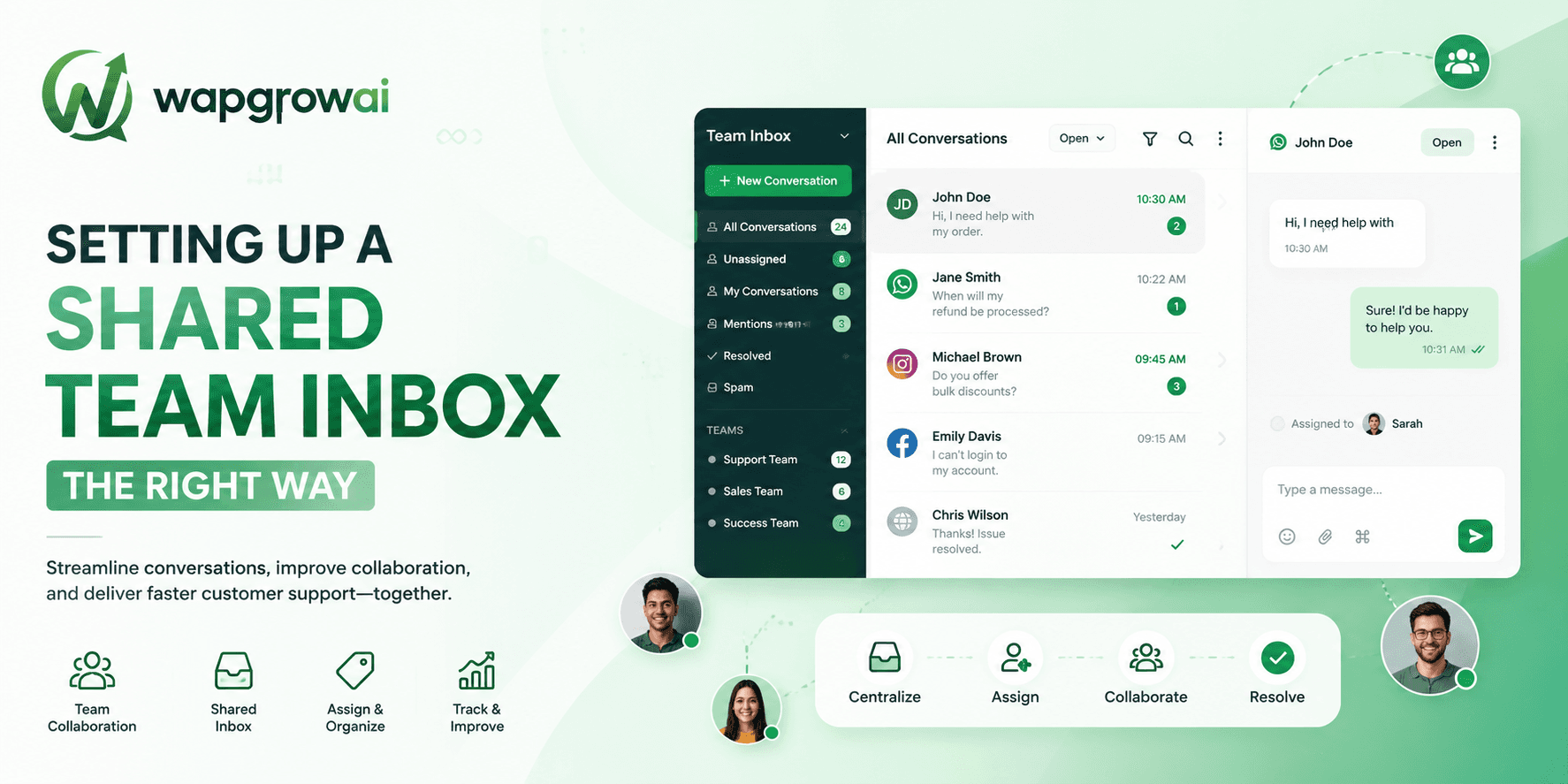
A shared inbox is one of those tools that appears to work on day one and quietly stops working by week three. The failure is never dramatic. Conversations simply start slipping — answered twice, or not at all, or answered eventually by somebody who had no idea what had already been said.
The cause is almost always the same: the inbox was switched on but never configured. Everybody can see everything, nobody owns anything, and the whole thing runs on the assumption that the team will coordinate informally. That assumption holds for about a fortnight.
Ownership is the whole game
The first principle: every conversation must have exactly one owner at all times. Not a team. Not a queue. A named person.
A conversation owned by everybody is owned by nobody, and it is the one that will still be unanswered on Monday.
This sounds obvious and is routinely violated, usually by teams who believe that a shared view is the same thing as shared responsibility. It is not. A shared view without assignment produces the classic pattern where three agents open the same thread, two of them assume somebody else has it, and the customer waits.
Choosing an assignment model
There are three models that work, and the right one depends on the shape of your team rather than its size.
Round-robin
Conversations are dealt out evenly to available agents. Simple, fair, and correct when everybody can handle everything. It breaks the moment some conversations genuinely need a specialist.
Skill-based routing
Route by topic, language, or product line, using tags applied by a bot or by keyword matching before a human ever sees it. More setup, dramatically better outcomes once you have any specialisation at all.
Ownership by relationship
The customer's existing account manager gets the thread, whatever it is about. Correct for high-value accounts and sales, wrong for support, where it creates single points of failure and long waits when that one person is away.
Collision detection, and why it matters more than it sounds
Two agents replying to the same customer within a minute of each other is not a small embarrassment. It tells the customer, immediately and unambiguously, that the business is not organised — and it usually contradicts itself in the process.
Any inbox worth using shows you, live, that somebody else has the thread open and is typing. Use it, and make it a rule that a thread you do not own is a thread you do not answer. If you have something to add, add it as an internal note.
Internal notes: the most underused feature you have
Internal notes are where the actual quality of a shared inbox lives. They are the difference between a customer having to repeat themselves and a customer being picked up mid-thought by a colleague who knows exactly where things stand.
- Note before you hand off. Never reassign a thread without a sentence explaining what has happened and what needs doing.
- Note the promise. If you told the customer you would check something and call back, that belongs in the thread, not in your head.
- Mention people directly. A note that tags the person who knows the answer gets answered; a note addressed to nobody does not.
- Keep notes factual. They are part of the customer record, and one day somebody will read them out loud.
Tags, but only the ones you will use
Every team builds a tagging taxonomy, and every team's taxonomy grows until it is useless. Thirty tags means no tags, because nobody can remember which one applies.
Start with the smallest set that answers a question you actually ask. Usually that is: the topic, the urgency, and the outcome. If a tag has never been used in a report or a routing rule, delete it. Tags exist to drive automation and reporting, not to describe conversations for the pleasure of describing them.
SLAs that mean something
An SLA that nobody is warned about is a target nobody meets. The useful configuration has three parts.
- A first-response target, differentiated by priority. Not a single global number.
- A warning before the breach, delivered to the assigned agent while there is still time to act.
- An escalation on breach, to a named person — not to a queue, and not to the whole team.
The warning is the part teams skip, and it is the part that actually changes behaviour. An alert after the SLA has been missed is a report. An alert five minutes before is an intervention.
Give the customer's history to whoever is answering
The final piece is context. An agent picking up a thread should see, without leaving it, who this person is, what they have bought, what they last complained about, and what was promised to them.
This is where the CRM integration stops being an IT project and starts being the reason your replies are good. The difference between 'Can I take your order number?' and 'I can see order 4021 is delayed — I have already asked the courier' is entirely a matter of what is on the agent's screen.
A configuration checklist
- Every conversation has exactly one owner, always.
- Assignment is automatic, with an explicit fallback for absence.
- Collision detection is on, and the team treats it as a rule rather than a hint.
- Handoffs require an internal note. No exceptions.
- Tags are few, and each one drives a rule or a report.
- SLAs warn before they breach, and escalate to a person.
- Customer history is visible inside the thread.
None of this is exotic, and all of it takes an afternoon. The teams that skip it do not notice for a fortnight — and then spend the next quarter wondering why their response time is fine on paper and terrible in practice.
Canned responses, and how they go wrong
Saved replies are the most obvious productivity win in a shared inbox, and the most reliable way to make your team sound like a call centre.
The problem is not the canned response. It is the canned response sent whole, without editing, to a customer whose situation does not quite match it. Customers can spot a template instantly — the register is slightly off, the specifics are missing, and the reply answers a question adjacent to the one they asked.
- Write canned responses as scaffolding, not as finished messages. The first line should always need editing.
- Keep them short. A long saved reply is one nobody customises, because customising it is more work than writing from scratch.
- Include the variable. If the reply mentions an order, it should pull the actual order number, not leave a gap the agent forgets to fill.
- Retire them ruthlessly. A saved reply quoting an out-of-date policy is worse than having none at all, because it is sent with confidence.
Handling the queue when it spikes
Every support team has bad days. A delivery partner fails, a product goes out of stock, an outage happens. The inbox fills faster than the team can empty it, and the configuration that worked fine at normal volume starts producing bad outcomes.
The instinct is to work harder and reply faster. The better move is to change the shape of the queue.
- Acknowledge everyone immediately, automatically, with the truth. 'We're seeing a delay with a delivery partner. We're replying to everyone — it may take an hour.' Honesty buys patience; silence spends it.
- Triage by type, not by arrival time. Ten people asking about the same known issue can receive one broadcast, not ten individual replies.
- Pull the specialists onto the spike and let the generalists hold the routine queue, rather than everybody doing everything badly.
- Turn off proactive campaigns for the day. Adding marketing volume to an angry queue is how a bad day becomes a bad week.
That last one gets forgotten constantly, because the campaign was scheduled a fortnight ago by somebody who is not watching the inbox today. Build the kill switch, and give the support lead permission to use it without asking.
Rolling out to a team that did not ask for this
The final piece is human. A shared inbox changes how people work, and it makes their work visible in a way that some of them will find uncomfortable.
The agent who was quietly the slowest responder on the team is about to be measurably the slowest responder on the team. How you handle that first month determines whether the tool is adopted or quietly sabotaged.
- Introduce metrics as team metrics before you introduce them as individual ones.
- Fix the process problems the data reveals before you address the people problems. Most slow responses are queue design, not laziness.
- Let the team write the tagging taxonomy. They will use the one they built and ignore the one you handed them.
- Review real conversations together, weekly, including your own. Nothing kills defensiveness faster than a manager critiquing their own reply.
Configure the inbox properly and it will make a good team faster. It will also make a struggling team's problems impossible to hide — which is uncomfortable, and which is, in the end, exactly why it is worth doing.
The first week, hour by hour
If you are setting one up from scratch, the order matters. Doing it in this sequence avoids the two weeks of chaos that most teams accept as inevitable.
- Day one: connect the number and give everybody their own login. Nothing else. Let the team simply use it as a shared view for a day and watch what goes wrong.
- Day two: turn on assignment. Pick round-robin, even if it is not the model you will end up with — it establishes ownership immediately, which is the thing that matters.
- Day three: add the tags. Three of them. Resist every request for a fourth until somebody can name the report it feeds.
- Day four: turn on collision detection and make the rule explicit in a team meeting. It is a behaviour change, not a setting.
- Day five: set SLAs and the warning threshold. Do not set an escalation to a queue; set it to a named person.
- The following week: connect the CRM, so the agent can see who they are talking to.
The temptation is to configure all of it before letting anybody in. Resist it. A team that has felt the pain of an unassigned queue for one day will adopt assignment enthusiastically; a team handed a fully configured system will spend a month working around rules they do not understand the purpose of.
Signals that the configuration has drifted
Six months later, every shared inbox has drifted. The tags have multiplied, the SLAs are being missed routinely and nobody flinches, and there is one agent who quietly handles everything difficult.
- Tag count above about a dozen. Somebody has been adding tags to describe conversations rather than to drive rules.
- An SLA that is missed more often than it is met. It is not an SLA any more, it is decoration — either fix the staffing or change the target honestly.
- One agent handling a disproportionate share of escalations. That is a training gap, and it is also a resignation risk.
- Internal notes that have stopped being written. Usually the first thing to go when the team gets busy, and always the first thing you miss.
A shared inbox is not a tool you install. It is a set of habits you maintain, and habits decay quietly under pressure.
Put a half-hour review in the calendar every quarter. Prune the tags, re-examine the SLAs against reality, and read ten conversations with the team. It is thirty minutes, it is dull, and it is the difference between an inbox that still works in a year and one that everybody has quietly started working around.
Three more,
worth your time
Ready togrow on WhatsApp?
Join 10,000+ businesses turning conversations into revenue.
Start free trialBook a demo