They Didn't Unsubscribe. They Blocked You. How to Run WhatsApp Campaigns Without Hurting Your Number
Every block and report counts against you. Seven habits that keep campaigns welcome, and your number healthy.
A WhatsApp campaign feels like a sure thing. People read WhatsApp messages, the offer is good, and the send button is right there. So the list gets bigger, the messages get more frequent, and for a while the results look great.
Then something quieter happens. A few people don't reply and don't unsubscribe. They block you, or tap “report”. Each of those is a signal WhatsApp uses to decide how welcome your messages are. Collect enough of them and your templates get paused, your messaging limit stops growing, and in serious cases Meta blocks your sending altogether.
This article explains how WhatsApp judges your campaigns, and seven habits that keep them welcome.
How WhatsApp judges your messages
Meta doesn't publish a formula, but it does say what it looks at. Your message quality is based on “how WhatsApp users have received your messages over the past seven days” (Meta's sending guidelines), weighted towards the most recent days. The signals include “blocks, reports, mutes, archives, and reasons users provide” when they block you.
Those signals feed three things you'll feel:
- Your messaging limit. This caps how many different people your business can start conversations with in a moving 24-hour period, and it's shared by all the phone numbers in your business portfolio. New accounts start at 250, then move up through 2,000, 10,000 and 100,000 to unlimited. Moving up requires high-quality messages across all your numbers and templates.
- Your templates. A template that collects negative feedback or poor read rates is marked low quality. If it continues, Meta pauses it for 3 hours, then for 6 hours, and the third time disables it.
- Your account. For excessive negative feedback, Meta's enforcement can range from a 1- or 3-day block on sending template messages to an account lock that only an appeal can lift.
The good news: since October 2025, a drop in your number's quality rating no longer lowers your messaging limit by itself. The bad news: the feedback still counts towards everything else above.
1. Only message people who asked to hear from you
Meta's opt-in rules are short. You must “clearly state that a person is opting in to receive communication from the business”, and state the business's name. The opt-in doesn't have to happen on WhatsApp: a checkbox at checkout, a form on your website, a sign-up sheet in your shop or an SMS all work, as long as they meet those rules and local law.
What doesn't work: a bought list, a list of everyone who ever called you, or the contacts of a business you acquired. Those are the people most likely to block you.
2. Make leaving easy
WhatsApp's Business Messaging Policy says you must respect every request to opt out, on or off WhatsApp. It sounds like a cost. It's actually protection: a person who can unsubscribe in one tap doesn't need to block you.
- Add an opt-out button to marketing templates. Meta's own template examples include quick-reply buttons like “Unsubscribe from Promos”.
- Honour typed requests. In WAPGROWAI, a message that says just STOP, STOP ALL, UNSUBSCRIBE or OPT OUT marks the contact as opted out of campaigns, and future campaigns skip them automatically. A chatbot can also include an Unsubscribe step, and a template button can start that chatbot.
- Respect WhatsApp's own setting. Customers can also stop marketing messages from your business inside WhatsApp itself. Messages to them fail with an error that means exactly that; don't retry.
3. Send fewer, better-targeted messages
The fastest way to collect blocks is to send everything to everyone. Segment instead:
- Customers who bought in the last 90 days, not everyone who ever bought.
- People interested in a category, not the whole list.
- One city's customers for a local event, not the whole country.
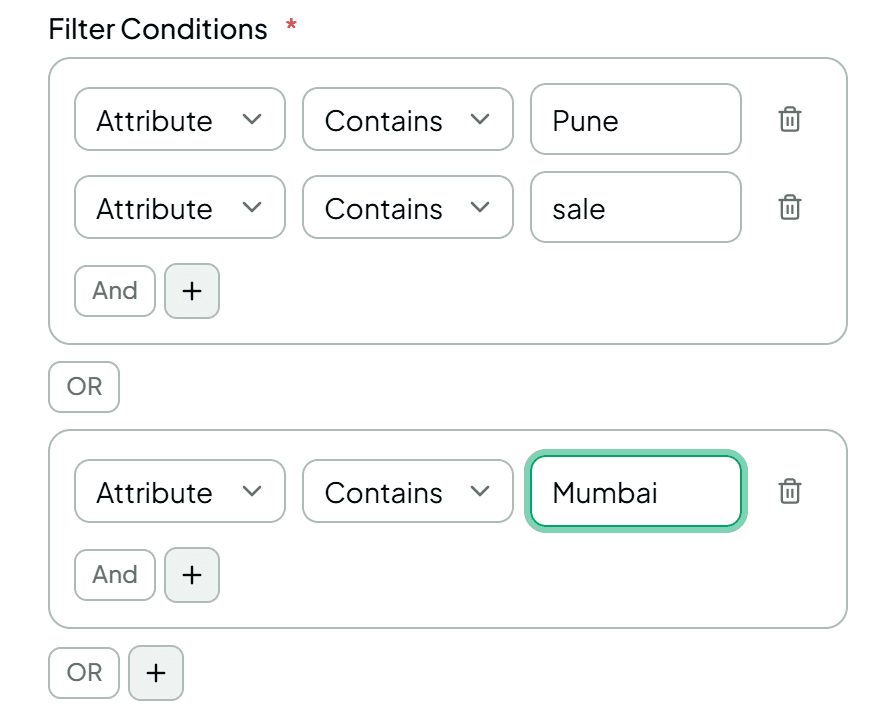
In WAPGROWAI, a segment filters contacts by name, phone number, opt-in status or the values you've saved in their attributes (a city, a product interest), and combines conditions with AND and OR.
WhatsApp also limits frequency for you. It caps how many marketing templates each person receives from businesses, and the cap “adapts automatically over time based on a person's recent engagement levels”. When it does, your message fails with error 131049, and Meta asks you to wait at least 24 hours before trying that person again. Retrying sooner doesn't help.
One more surprise worth knowing: WhatsApp doesn't currently deliver marketing templates to phone numbers in the United States at all.
4. Write messages people would have asked for
Meta's own guidance is to make messages “highly personalized and useful”, to avoid sending too many messages per day, and to avoid open-ended welcome or introductory messages. In practice:
- Lead with the reason. “Your size is back in stock” beats “Check out our new collection!”.
- One message, one point. If it needs three paragraphs, it's an email.
- Write per segment. The message for last month's buyers shouldn't be the one for people who've never ordered.
- Choose the honest category. A promotion is marketing, even if it mentions an order. Meta checks, and recategorises.
5. Give every message a next step
A message people can act on gets replies instead of blocks. Add quick-reply buttons with obvious choices: “Show me”, “Remind me later”, “Not interested”.
In WAPGROWAI, each quick-reply button on a template can trigger an action when tapped: start a chatbot, send a message or send another template. So “Show me” can open a product menu instantly, at any hour. A reply also opens the 24-hour window, inside which your team can answer normally.
6. Grow your limit gradually
The first step up, from 250 to 2,000 people a day, comes from verifying your business or from sending 2,000 high-quality messages to different people within 30 days. After that, WhatsApp raises the limit as you use it well.
That makes your first campaigns the most important. Start with your most engaged customers, the people who've ordered recently or messaged you, rather than your coldest contacts. Good early feedback is what earns the next tier.
7. Watch the signals, not just the sends
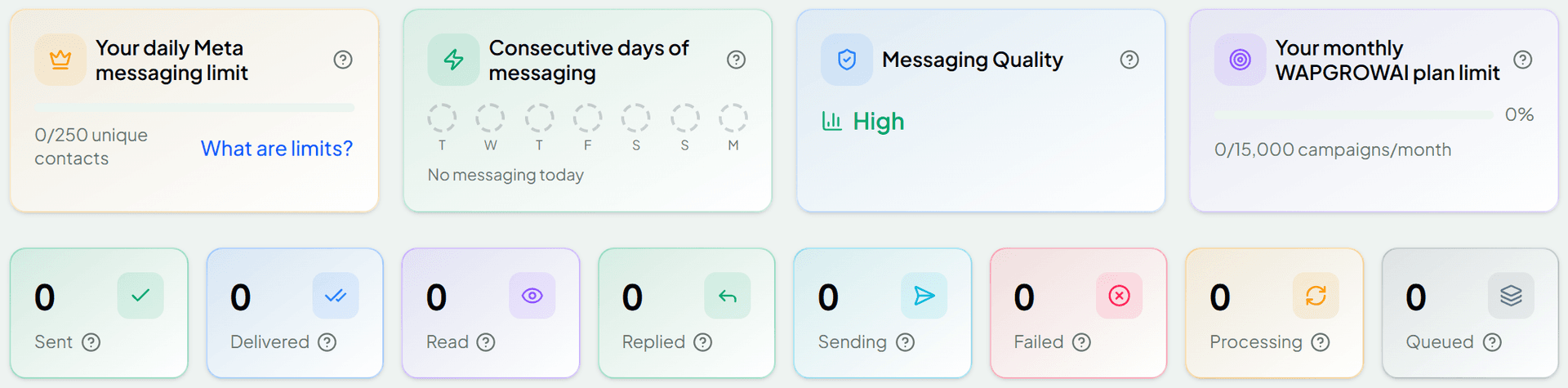
After every campaign, look past “sent”:
- Delivered and read tell you whether it arrived and was opened.
- Replied tells you whether it started conversations.
- Failed, with the reason, tells you who WhatsApp held back and why.
- Quality rating and messaging limit tell you how WhatsApp sees your number right now.
WAPGROWAI shows your number's quality rating and messaging limit in your channel settings and on the campaigns overview, and each campaign's sent, delivered, read, replied and failed counts.
If a template suddenly stops sending, check whether Meta has paused it. A paused template comes back on its own after the pause, but it's a warning: change the message or the audience before the third strike disables it.
A pre-send checklist
- Did everyone on this list opt in to hear from this business?
- Is this segment the people the message is actually for?
- Does the first line say why they're getting it?
- Is there a clear next step, and a one-tap way out?
- Is the category honest?
- When did these people last hear from you?
- After sending: check failed reasons, replies, and your quality rating.
WhatsApp rewards businesses that people are glad to hear from. Every habit above is a way of making sure that's you.
For what each message costs since October 2026, see WhatsApp's Pricing Changed on October 1. For what to do when the replies arrive, see You Don't Have a Lead Problem. You Have a Reply-Time Problem.
Sources
- Sending messages — Meta for Developers
- Getting opt-in — Meta for Developers
- WhatsApp Business Messaging and Commerce Policy — WhatsApp
Three more,
worth your time
Ready togrow on WhatsApp?
Join 10,000+ businesses turning conversations into revenue.
Start free trialBook a demo